Weather Kitty - App & Widget
- 4.9
- Rating
- 1.00M
- Installs
- Free
- Price

 Analysis by App-foxy
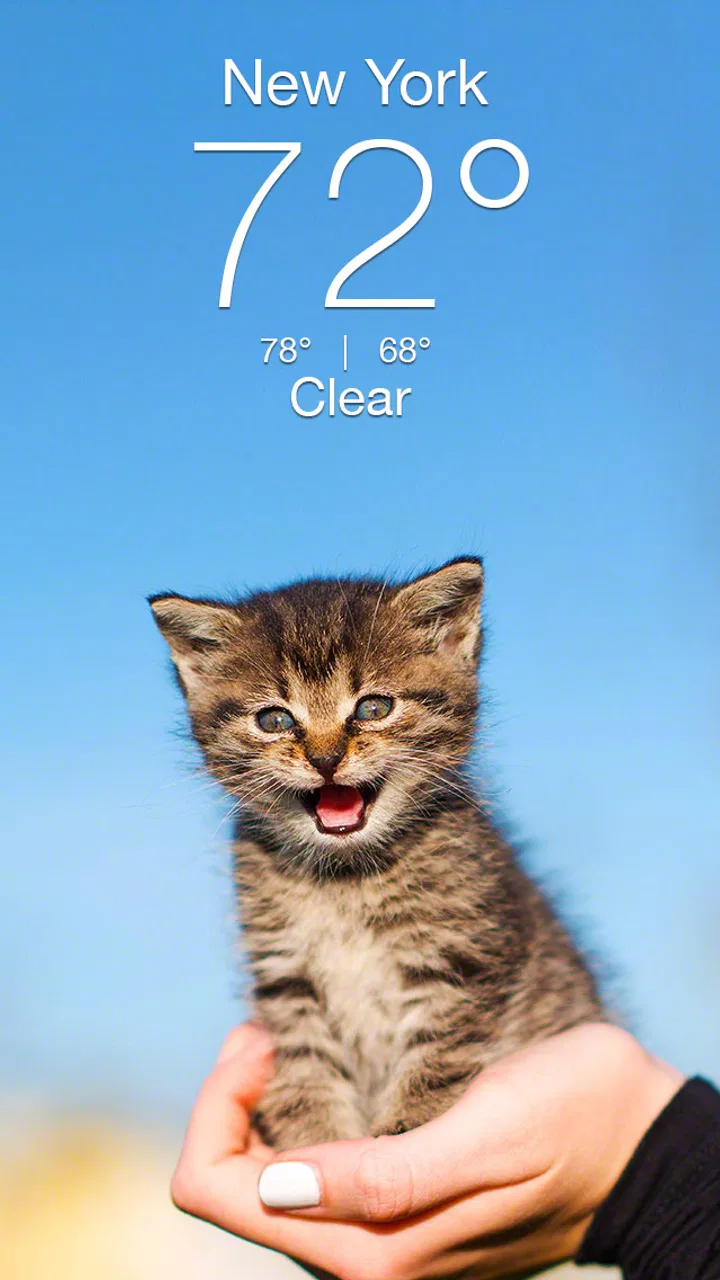
I installed Weather Kitty - App & Widget expecting a simple novelty forecast, but I ended up appreciating it as a pleasant way to build a small weather-checking habit. The app comes from Weather Creative Inc. and belongs to the weather category, yet its appeal is not just the information on screen. It gives a routine task a warmer personality by pairing local forecast details with cat-themed presentation. That makes the experience feel less mechanical than opening a standard weather utility.
The central idea is easy to understand: check the weather, see a cat, and get a forecast without turning the moment into a serious planning session. In my experience, that simplicity is exactly where the app works best. I would recommend it to someone who wants a friendly daily glance at conditions, especially if conventional weather apps feel too dense or visually cold. I would not choose it as my only tool for demanding outdoor decisions, but it is an enjoyable everyday companion.
How I built a useful daily weather routine
My baseline workflow with Weather Kitty - App & Widget was deliberately simple. I opened it in the morning to check whether I needed a jacket or an umbrella, then returned to it before leaving for work or running errands. That sounds ordinary, but the app’s cat-focused presentation made the repeated check feel more inviting. Instead of treating weather as a chore, I found myself using it as a quick pause before deciding what to wear and how much time to allow for travel.
You May Also Like

 Blood Strike: 2.5 Anniversary
Blood Strike’s Loadouts Turn Every Drop Into a Tactical Gamble
A close look at Blood Strike’s custom loadouts: how fast access to signature weapons reshapes its battle royale rhythm, rewards preparation, and narrows the gap between fights.

 Pandora - Music & Podcasts
Pandora’s Music Is Easy to Start, but Harder to Recover
Pandora’s strength is its low-effort path from a seed to a station. Its weak spot is how much confidence it asks you to place in connection, setup, and quiet recovery.

 8 Ball Pool
 Is Built on Rivalries, Rematches, and Routine
A close look at the rivalries, rematches, shared routines, and unanswered safety questions that turn a quick pool match into a persistent mobile community.

 Samsung Music
’s Quiet Strength Is Playing What You Already Own
Its reach comes less from spectacle than from dependable access to a personal library. That simplicity is both the app’s strongest retention engine and its ceiling.

 AccuWeather: Weather Radar
AccuWeather Review: A Quick, Clear Forecast for Everyday Decisions
For everyday plans, the best forecast is the one you can understand quickly. AccuWeather makes rain timing, radar, and local conditions easy to act on, with a few trade-offs.

 Hill Climb Racing
Why Hill Climb Racing Still Turns Crashes Into One More Run
A tiny car, a bumpy hill and one more upgrade: Hill Climb Racing keeps resurfacing because its simple chaos makes every near-miss feel personal.
More From Our News Desk



The most practical use is a short-range decision. If I had plans later in the day, I checked the forecast before leaving rather than relying on the sky at that exact moment. For a walk, school run, commute, or grocery trip, that is usually enough information to make a sensible choice. The app is particularly comfortable for people who want a quick local overview rather than a wall of meteorological detail.
I also found that the visual theme changes how often I check. A serious weather dashboard can encourage over-analysis, with multiple panels competing for attention. Weather Kitty feels more casual, so I can glance at it and move on. That is a genuine strength for users who want useful awareness without making weather tracking into a hobby.
Its store summary promises a smile whenever you check the local forecast, and that idea matches my experience more than a standard promise of accuracy or technical depth would. The cats are the personality layer, while the forecast remains the reason to open the app. The balance is important: the theme adds charm, but it does not replace the basic purpose of checking local conditions.
One everyday scenario shows where it fits well. Before leaving for an afternoon appointment, I would check the current forecast, look ahead to the return trip, and decide whether carrying rain protection was worth the inconvenience. If the weather looked stable, I could stop there. If the conditions seemed changeable, I would use a more detailed weather source for confirmation. That two-step habit keeps Weather Kitty enjoyable without asking it to do a job better suited to a specialist service.
What the cat theme changes in real use
The cat design is not merely decoration from my point of view. It makes the app easier to remember and gives it a recognizable emotional tone. Many weather utilities are interchangeable once they are installed: open, scan numbers, close. Here, the visual identity gives me a reason to return to this particular app instead of automatically using whichever forecast tool happens to be nearby.
That personality also makes it a good choice for shared devices or family use, provided everyone is comfortable with the Teen content rating. It can be less intimidating for someone who dislikes technical interfaces, and the playful style may encourage a reluctant user to check conditions before going outside. I would still explain that a cute presentation does not mean the forecast should be ignored when conditions are important.
The trade-off is clear. If you prefer compact charts, radar layers, severe-weather alerts, or highly technical comparisons, the cat-centered approach may feel too light. I would skip it as a primary weather solution for mountain trips, boating, aviation, or any situation where I need specialized environmental information. For ordinary daily planning, however, its friendliness is more than a gimmick.
Settings I would check before settling in
My first recommendation is to spend a few minutes checking the app’s available settings instead of accepting the initial setup without thought. The most important choice in any local weather app is whether the selected location reflects where you actually spend time. A forecast for a nearby city may look close enough, but small differences can matter when rain or temperature changes across a region.
I prefer a deliberate location routine: set the place I use most often, then review it whenever I travel or change my daily schedule. That avoids a common mistake in weather apps, where a user keeps reading a familiar location even after moving between home, work, and another town. Weather Kitty is most useful when the location on screen matches the decision I am about to make.
If you use the widget, I would also check how it fits your home screen rather than placing it wherever there happens to be space. A widget is valuable only when it is visible during the moments you already reach for your phone. I found that placing it near my calendar or commute-related apps created a natural planning sequence: check the day, check the weather, then decide what to bring.
There is a subtle trade-off between convenience and clutter. A widget can reduce the need to open the full app, but too many home-screen elements make every glance less useful. I would keep the weather view in a prominent but uncluttered position and remove it if I noticed myself ignoring it. The goal is not to display weather constantly; it is to make the right check effortless.
Because the app is free, it is easy to install without much commitment. That does not mean every optional purchase will suit every user, though. In-app purchases range from $0.99 to $49.99 per item, so I would review any purchase screen carefully and decide whether the extra value matches how often I use the app. Someone who mainly wants a charming forecast glance may be perfectly satisfied without spending anything.
Shortcuts and repeatable patterns that save time
Experienced use is less about discovering secret functions and more about building a repeatable sequence. My preferred pattern is to check Weather Kitty at the same points in the day: after waking up, before leaving for a longer outing, and again when plans depend on the evening forecast. That rhythm prevents both extremes—forgetting the weather entirely and checking it every few minutes without gaining anything.
The widget is the obvious time-saver, but the bigger improvement comes from deciding in advance what question I want answered. In the morning, I ask whether clothing and transport need to change. Before an outing, I ask whether conditions are likely to make the plan uncomfortable. By giving each check a purpose, I spend less time browsing and avoid treating every small forecast variation as a reason to alter my day.
I also recommend separating quick checks from confirmation checks. Weather Kitty works well for the first pass: it tells me whether the day looks ordinary, wet, cold, or worth a closer look. When the plan is sensitive to timing or safety, I then consult a more detailed weather service. This is not a criticism of the app so much as a sensible division of labor between a friendly daily tool and a specialist source.
Another useful habit is to compare the forecast with what actually happened, without turning that into a formal record. If the local conditions repeatedly feel different from what the app suggests, I would first verify the selected location and then compare another source. The point is not to blame the app immediately; it is to make sure the setup reflects the place and timing I care about.
The app’s cheerful style also makes it suitable for a low-friction family routine. A parent could use the widget as a prompt to discuss clothing or outdoor plans with a child, while an older user might appreciate a less intimidating interface. I would not choose it solely for those possibilities, but they are meaningful advantages over a dense forecast screen that assumes technical confidence.
Where the lightweight approach reaches its limits
My main reservation is that charm cannot answer every weather question. When I need minute-by-minute rain timing, detailed wind information, radar interpretation, or specialized outdoor planning, I want a service designed around those tasks. Weather Kitty is better at encouraging a glance than supporting a complete weather investigation.
That limitation matters most when a decision has consequences. For a casual walk, a school commute, or choosing whether to carry a light layer, the app’s simplicity is appropriate. For a long hike, an event that cannot move indoors, or travel through changing conditions, I would use it only as an initial reference and then verify the details elsewhere. A user who expects one app to cover every level of weather analysis may find this approach frustrating.
The playful presentation may also divide people. I enjoy it because it gives the forecast character, but some users want a neutral, professional dashboard every time. If you dislike decorative themes or prefer to compare several technical indicators at once, the cats may feel like visual noise rather than a benefit. The app is intentionally distinctive, and that means it will not be universally appealing.
There is also a practical question about long-term attention. Novelty can make an app enjoyable at first, but the real test is whether the workflow remains useful after the initial amusement fades. For me, it does because the widget and quick local check fit naturally into daily planning. If I only opened it to look at the theme, I would probably stop using it once the novelty passed.
Compatibility is worth considering before installation. The app supports a minimum operating system of 7.0, which makes it accessible to many older devices, while the current version is 6.1.8. I would still check that the phone’s software and screen layout handle the app comfortably, especially if the widget is the main reason for installing it. The age rating is Teen, so families should take that label into account rather than assuming the cat theme automatically makes it suitable for every age group.
Who should install it, and who should look elsewhere?
I think Weather Kitty is a strong fit for people who want a free weather app with personality, a quick local overview, and a widget that can become part of a morning routine. It is especially appealing if standard forecast apps feel overcomplicated or if you need a small prompt to remember checking conditions before leaving home.
It is also a good choice for users who enjoy themed interfaces but still want a practical reason to return. The average rating is 4.9 from around 75 thousand ratings, and the app has passed 1 million installs, which suggests that its combination of utility and character has found a broad audience. Those figures do not determine whether it suits me, but they do make the app feel established rather than experimental.
I would look elsewhere if my priority were advanced meteorological detail, professional outdoor planning, or a completely minimal interface. I would also avoid relying on it alone when a forecast affects safety, expensive travel arrangements, or a time-sensitive event. In those cases, I want broader context and more specialized tools than a cheerful local forecast app is designed to provide.
For most people, the decision is therefore less about whether the app is good in the abstract and more about what kind of weather relationship they want. If you want data first and personality never, choose a conventional utility. If you want a pleasant first check that helps you form a daily habit, Weather Kitty makes a convincing case.
My verdict after making it part of the routine
Weather Kitty - App & Widget succeeds because it understands that weather checking is often a tiny daily task, not a research project. The cats give that task a memorable identity, while the local forecast and widget keep it grounded in practical use. I like the app most when I treat it as the first step in planning rather than the final authority for every situation.
Its free price makes trying it easy, though the in-app purchase range means I would pay attention before confirming any optional item. The developer, Weather Creative Inc., has created an app with a clear point of view instead of another anonymous forecast screen. That focus is its biggest strength and its most obvious limitation: the same playful design that makes it enjoyable may not satisfy users seeking a serious technical dashboard.
My best advice is to set the correct location, place the widget where it supports an existing routine, and decide which moments genuinely require a forecast check. Use the app for everyday choices, then switch to a more detailed source when conditions or plans demand deeper information. The smartest way to use Weather Kitty is as a friendly first glance, not as a replacement for every weather tool.
After using it that way, I would recommend it to a friend who wants weather information to feel lighter and more approachable. It is not the right choice for everyone, and I would not pretend otherwise. But for ordinary mornings, quick departures, and people who appreciate a little character on their screen, it turns a forgettable utility into a habit I was happy to keep.
FAQs for Weather Kitty - App & Widget
01What features does Weather Kitty offer?
Weather Kitty provides detailed weather forecasts with a charming twist. You get hourly and 10-day forecasts, along with severe weather alerts. The app’s unique feature is its adorable cat themes that change according to the weather and time of day, making checking the weather a delightful experience.
02Is Weather Kitty free to use?
Yes, Weather Kitty is free to download and use. However, it offers in-app purchases, such as additional cat themes and an ad-free experience. These purchases are optional and enhance the overall user experience, but they’re not necessary to access the basic weather features.
03How accurate is the weather information in Weather Kitty?
Weather Kitty sources its weather data from reliable meteorological services, ensuring accuracy and timeliness. Users generally report satisfaction with the precision of the forecasts. However, as with any weather app, occasional discrepancies can occur due to rapidly changing weather conditions.
04Can I customize the cat themes in Weather Kitty?
Yes, customization is a key feature of Weather Kitty. Users can choose from a variety of cat themes, each with different breeds and looks. Additional themes are available for purchase. This personalization makes the app both functional and enjoyable for cat lovers.
05Does Weather Kitty offer any widgets?
Weather Kitty includes widget functionality, allowing users to place a weather widget directly on their home screen. This widget provides quick access to current weather conditions and forecasts, complete with the delightful cat imagery, without needing to open the app.
Pros
- Adorable cat themes brighten forecasts.
- Widget is customizable with favorite cats.
- Accurate weather updates in real-time.
- Easy-to-use interface for quick access.
- Supports multiple locations for tracking.
Cons
- Ads can be intrusive at times.
- Limited free themes without purchase.
- Some features need constant internet.
- Updates occasionally lag on slower devices.
- No radar or detailed maps available.

Weather Kitty - App & Widget
Gallery